Optimizing Delta Tables in the Silver Layer
Congrats you’ve built your first medallion architecture. Good news is you’ve finally gotten through all the business lines of questions, validation, and intense engineering workloads. The issue is now your processes are slowly getting slower and slower. Why? How do you fix that? Why is your capacity spiking?
In this blog post I’ll talk about how to optimize your silver layer. And no I’m not talking about the easy stuff like only bringing in the columns you need, or proper data types. We’re going to dive deep into spark properties and setting up your environment.
To keep performance fast as data grows and changes, Fabric relies on Delta Lake optimizations—not Parquet optimizations. Because Delta Tables support updates, deletes, merges, and streaming workloads, the transaction log can grow, files can fragment, and query performance can degrade over time. The good news: Fabric includes several intelligent features that mitigate this. Below is an overview of the major Delta optimization mechanisms available in Fabric today, why they matter, and when to use them.
But first lets break down what Parquet files really are. If you already know this (or simply don’t care) you can skip this part. But I know some people like to know how the sausage gets made.
Parquet- What is it and why you should care?
Parquet gets talked about like it’s some magical file format that automatically makes your analytics fast just by existing. And to be fair… it kind of is. But only if you treat it right.
Parquet is an open-source columnar storage format designed specifically for analytics.
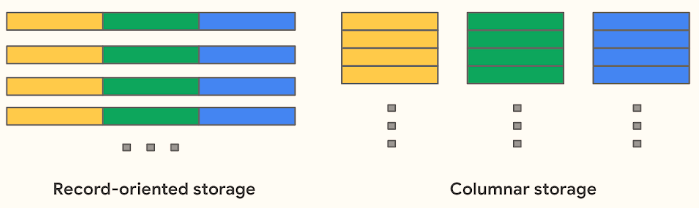
At a high level, Parquet stores data by column instead of by row, which is what unlocks most of its benefits:
Better compression (similar values compress really well together)
Faster queries because engines only read the columns they need
Predicate pushdown meaning filters get applied before all the data is read
Schema evolution so your data doesn’t explode the first time someone adds a column
That’s why Parquet is the default for basically every modern analytics engine. It’s efficient, flexible, and plays nicely with distributed systems.
quick note on faster queries – I recently had a customer try to convince me that they need a table with 100 columns in it for analytics. It doesn’t matter what file format you use – a select * against that many columns will be slow. No amount of optimization can save poor data modeling. Ok first rant over.
Okay, But What Does “Columnar” Actually Mean?
Well to oversimplify it- columnar means all of your data is stored column by column, not row by row. Look at this visual below.
When you run a report, you’re usually asking questions like:
“What was total revenue last month?”
“How many orders were flagged as delayed?”
“Show me counts by status”
You don’t need every column. You need two or three per query which means less data scanned resulting in:
Faster queries
Lower compute usage
Happier capacity admins and business owners who have to spend less money.
What About the Negatives of Parquet?
Up to this point, Parquet sounds perfect. And honestly, for analytics reads, it mostly is.
But here’s the part that usually gets glossed over:
Parquet is immutable.
Once a Parquet file is written, it can’t be updated in place. There’s no “go change row 37” operation. That design choice is what makes it fast for reads—but it also introduces some very real tradeoffs once you start changing data.
And in the Silver layer, you change data a lot.
So when you “update” or “delete” data, what’s really happening is:
New Parquet files get written
Old data gets logically invalidated
The old files still exist but fabric is smart enough to point to the proper file(s).
Over time, this creates:
Lots of small files
Files full of data you no longer care about
Extra work for the engine every time you query
Don’t believe me? Open a spark notebook and run a describe detail on a table that has a lot of transactions on it.
%sql Describe Detail [table]
Let me know what the stats show on one of your non optimized tables.
I bet you’ll see a bunch of files and more so a lot of them aren’t needed. If you’re from the Stone Age you probably are thinking to yourself “That sounds like dead tuples” and you’d be right. It’s data that is technically gone, but still hanging around until someone cleans it up.
Now that you understand Parquet, it’s important to recognize that Delta Tables are a transactional layer built on top of Parquet. Fabric stores Delta Tables as Parquet files plus a transaction log. Because of this extra metadata and transactional behavior, optimizing Delta Tables requires different techniques than simply optimizing Parquet.
Delta Features That Actually Matter in the Silver Layer
Deletion Vectors
Deletion vectors are a Delta Lake optimization that work around Parquet immutability, avoiding full file rewrites when only a handful of rows change.
By default, if a single row in a Parquet file needs to be deleted or updated, Delta Lake performs a Copy on Write approach - which rewrites the whole file. For large Parquet files, that’s expensive, especially in the Silver layer where you’re continuously applying row‑level CDC, merges, or backfills.
With deletion vectors enabled, Delta takes a smarter approach. Instead of rewriting the file immediately, it records which rows are no longer valid and stores that information separately. This is often referred to as Merge‑on‑Read. When the table is queried, Delta applies those deletion markers to exclude invalid rows at read time.
The result:
Far fewer file rewrites
Less write amplification
Faster DELETE and MERGE operations
In other words: you can invalidate one row out of 100,000 without paying the cost of rewriting the entire file.
Auto Compaction
Auto compaction combines small Parquet files within a Delta table’s partitions to reduce the classic small file problem. It’s triggered after a successful write and runs synchronously on the cluster that performed the write.
Rather than rewriting the entire table, auto compaction groups small files together and writes fewer, larger files. Files may be compacted multiple times as new data arrives, and only stop being considered once they reach the effective size threshold (for example, at least half of the target file size). This keeps ingest and merge pipelines fast while gradually improving file layout over time.
Why it matters
Reduce file sprawl
Improve read performance (less files = fewer metadata lookups)
Keep your table layout healthy—without manual OPTIMIZE jobs. Auto compaction quietly maintains good file hygiene, this way engineers don’t have to routinely schedule OPTIMIZE jobs or manually manage file layout.
Adaptive Target File Size
Hardcoding Parquet file sizes is a guessing game. At some point, everyone hears a rule like “128 MB or 256 MB files are ideal” and locks it into a Spark config. It works - until your data, usage patterns, or table size change.
Silver workloads are not static. Ingest volumes grow, merges become more frequent, backfills happen, and CDC patterns evolve. A file size that was perfect at 5 million rows quietly becomes a bottleneck at 500 million.
Adaptive target file sizing removes that guesswork. Instead of enforcing a fixed size forever, Fabric dynamically adjusts file sizes based on table-level metrics (such as overall table size) at write time. The engine determines an appropriate target size per write, rather than relying on a single hardcoded value in the table definition.
Fast OPTIMIZE
Traditional OPTIMIZE rewrites every bin of small files it finds - even ones that are already “good enough.” That wastes compute, drags out jobs, and doesn’t always move the performance needle. Fast OPTIMIZE thinks before it rewrites. It scans each bin and only compacts it when the result is expected to meet the minimum file size threshold or when there are enough small files to justify compaction.
The outcome is a tighter file layout, fewer tiny files, and more efficient reads. Query planning becomes cheaper, scans become faster, and metadata pressure drops. Capacity usage becomes far more predictable, because the work happens through Fabric’s native engine instead of large Spark shuffles.
What Fast OPTIMIZE Actually Does
Looks at each group of files (bins) before rewriting anything.
Skips bins where compaction won’t improve things.
Focuses compaction work only where it materially improves the resulting file layout.
File Level Compaction Targets
File-level compaction targets define the file size thresholds used to guide compaction decisions. They determine when combining small files is worthwhile and when a file is considered large enough to stop being compacted. By providing clear size boundaries, they prevent unnecessary rewrites and keep compaction work focused on changes that meaningfully improve file layout.
Optimize Write and V-Order:
Optimize Write acts as pre-write compaction. It introduces additional shuffle and coordination during writes to avoid producing small files in the first place. This can be extremely valuable for trickle or micro-batch workloads (for example, structured streaming jobs or frequent small inserts) where each write would otherwise generate undersized files. In those cases, Optimize Write can reduce downstream compaction work and improve overall efficiency.
However, for many workloads Optimize Write is often a poor trade. Paying extra write-time cost to produce “perfect” files is inefficient when those files are likely to be invalidated, merged, or compacted again shortly after. In these scenarios, pre-write compaction simply shifts work earlier without reducing total work.
V-Order has a similar trade-off. It optimizes file layout for analytical read patterns, which is highly effective when data is relatively stable. Optimizing read layout in a layer where data is constantly changing often results in wasted write effort with little lasting benefit.
Closing Thoughts:
The Silver mindset should be cheap, resilient writes first - smart cleanup later. Enable Optimize Write only when the write pattern would otherwise generate excessive small files. Let deletion vectors absorb row-level churn, rely on auto compaction and adaptive target file sizing to manage file sprawl over time, and use Fast OPTIMIZE to focus heavy rewrite work where it actually matters. Save aggressive read-path optimizations like V-Order for Gold when using direct lake.
Unlock Faster Writes in Delta Lake with Deletion Vectors | Miles Cole
What are deletion vectors? - Azure Databricks | Microsoft Learn
Mastering Spark: The Art and Science of Table Compaction | Miles Cole
Configure Delta Lake to control data file size - Azure Databricks | Microsoft Learn
Additional Notes:
With the new release of Runtime 2.0 there are some exciting things to look for (Spark 4.0 and Delta Lake 4.0 to name a few). There are some limitations though since this is experimental preview. One of the most notable to me is:
- You can read and write to the Lakehouse with Delta Lake 4.0, but some advanced features like V-order, native Parquet writing, autocompaction, optimize write, low-shuffle merge, merge, schema evolution, and time travel aren't included in this early release.
For more information check out: Runtime 2.0 in Fabric - Microsoft Fabric | Microsoft Learn